F3 — Segment Routing over IS-IS (SR-MPLS)
Goals
Build the primary transport path directly on the F2 IS-IS underlay. This lab intentionally does not configure LDP or BGP.
By the end of this lab you will be able to:
- Enable MPLS forwarding and define a shared SRGB
- Enable segment routing and MPLS-TE under the IS-IS instance
- Assign a prefix-SID to each PE loopback
- Verify the SR-MPLS transport labels and loopback-to-loopback forwarding
Prerequisites
- Complete F1 and F2, or deploy this lab with its included F2 baseline.
- Make the SAOS 10x image
vrnetlab/ciena_saos:10-12-00-0228(release 10.12.00.0228) available to Containerlab. - Activate the built-in trial license after deployment.
Topology
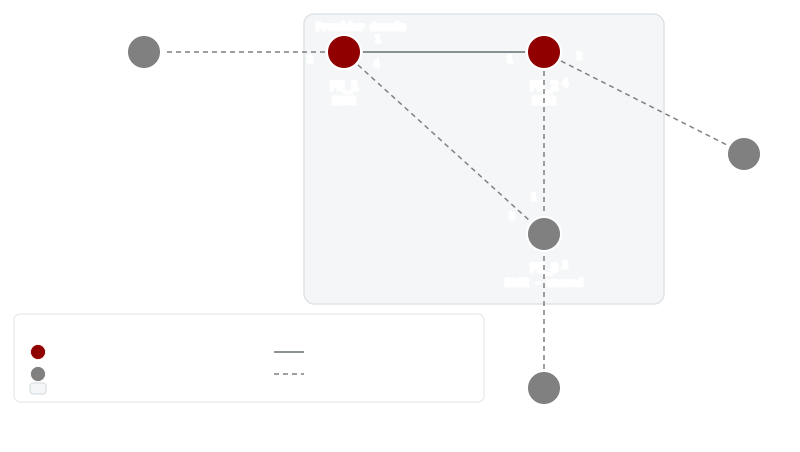
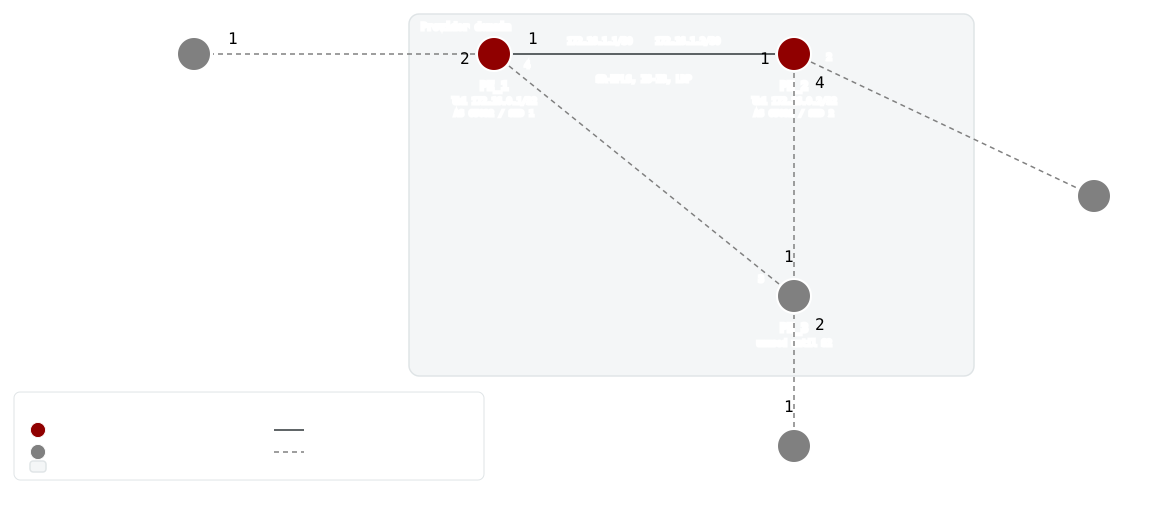
PE_1 and PE_2 use port 1 for the active IS-IS and SR-MPLS core link. The other nodes and links are reserved for later Services labs.
Addressing and SID plan
| Node | Loopback | Core address | Prefix-SID index |
|---|---|---|---|
| PE_1 | 172.16.0.1/32 | 172.16.1.1/30 | 1 |
| PE_2 | 172.16.0.2/32 | 172.16.1.2/30 | 2 |
Deploy
Startup Configs
The checkpoint baseline each node boots from. If you are assembling the lab by hand, create a configs/ folder next to topo.clab.yml and copy each file into it before you deploy.
- PE_1.cfg.partial
- PE_2.cfg.partial
- PE_3.cfg.partial
- CE_1.cfg.partial
- CE_2.cfg.partial
- CE_3.cfg.partial
Containerlab topology
Download the topology file: topo.clab.yml
name: F3-SR-MPLS
topology:
  defaults:
    kind: ciena_saos
    image: vrnetlab/ciena_saos:10-12-00-0228
    labels:
      lab-mode: hands-on
      prereq-lab: F2-IS-IS-Routing
  nodes:
    PE_1:
      type: '5162'
      startup-config: configs/PE_1.cfg.partial
    PE_2:
      type: '5162'
      startup-config: configs/PE_2.cfg.partial
    PE_3:
      type: '5162'
      labels:
        lab-state: unused
      startup-config: configs/PE_3.cfg.partial
    CE_1:
      type: '3984'
      labels:
        lab-state: unused
      startup-config: configs/CE_1.cfg.partial
    CE_2:
      type: '3984'
      labels:
        lab-state: unused
      startup-config: configs/CE_2.cfg.partial
    CE_3:
      type: '3984'
      labels:
        lab-state: unused
      startup-config: configs/CE_3.cfg.partial
  links:
  - endpoints: [ "PE_1:1", "PE_2:1" ]
  - endpoints: [ "PE_1:2", "CE_1:1" ]
  - endpoints: [ "PE_2:2", "CE_2:1" ]
  - endpoints: [ "PE_2:4", "PE_3:1" ]
  - endpoints: [ "PE_1:4", "PE_3:3" ]
  - endpoints: [ "CE_3:1", "PE_3:2" ]
Start from checkpoint
LAB=F3-SR-MPLS
cd labs/${LAB}            # from the repo root, or cd into the unpacked directory
containerlab deploy -t topo.clab.yml
Equivalent invocation from the repo root:
containerlab deploy -t "labs/${LAB}/topo.clab.yml"
Connect to the active PEs:
ssh diag@clab-F3-SR-MPLS-PE_1
ssh diag@clab-F3-SR-MPLS-PE_2
Default credentials: diag / ciena123
Instructions
- Task 1: Verify the deployed topology
- Task 2: Configure SR-MPLS on PE_1
- Task 3: Configure SR-MPLS on PE_2
- Task 4: Verify the primary transport
Task 1: Verify the deployed topology
Summary — This lab starts from the F2 IS-IS baseline, already preloaded in the startup configs. Before layering segment routing on top, confirm the IGP actually works: the loopbacks live on different prefixes than the shared link, so reaching a neighbor's loopback requires an established adjacency and exchanged routes, not just cable connectivity.
Implementation — Nothing to configure yet: inspect the preloaded
baseline and ping across it. Each PE carries loopback lb1
(172.16.0.1/FC00::1 on PE_1, 172.16.0.2/FC00::2 on PE_2), the
routed core link PE_1-PE_2-if on 172.16.1.0/30 and FC00::600/127, and
IS-IS instance Bootcamp running level-1 with a shared interface password.
PE_3, CE_1, and CE_2 are deployed but carry only a hostname; they sit
idle in this lab.
Healthy state is a clean 100.00 percent success pinging FC00::2 from
PE_1 and FC00::1 from PE_2 — each router reaching the other's loopback
address. Because those loopbacks are /128s advertised only through IS-IS,
success proves the Bootcamp adjacency formed (matching level-1 passwords
included) and LSPs were flooded and installed. Adjacencies take a little
time after deploy, so an initial failure right after boot is expected to
clear on retry.
Question to consider: why does pinging FC00::2 prove more than pinging the
far end of the FC00::600/127 link would?
Verify (show mode) on PE_1:
ping ip destination FC00::2 source FC00::1 repeat-count 5
Pass: Output contains 100.00 percent
Example output
Sending 5 ICMP Echos to FC00::2, timeout is 1 second

Codes:
'!' - Success, 'Q' - Request not sent, '.' - Timeout

 Type 'Ctrl+C' to abort

! seq_num = 1  RTT = 2.42 ms  TTL = 255
! seq_num = 2  RTT = 2.60 ms  TTL = 255
! seq_num = 3  RTT = 2.38 ms  TTL = 255
! seq_num = 4  RTT = 2.95 ms  TTL = 255
! seq_num = 5  RTT = 3.27 ms  TTL = 255
Success Rate is 100.00 percent (5/5)
Round-trip min/avg/max = 2.38/2.72/3.27
Verify (show mode) on PE_2:
ping ip destination FC00::1 source FC00::2 repeat-count 5
Pass: Output contains 100.00 percent
Example output
Sending 5 ICMP Echos to FC00::1, timeout is 1 second

Codes:
'!' - Success, 'Q' - Request not sent, '.' - Timeout

 Type 'Ctrl+C' to abort

! seq_num = 1  RTT = 3.13 ms  TTL = 255
! seq_num = 2  RTT = 2.88 ms  TTL = 255
! seq_num = 3  RTT = 3.63 ms  TTL = 255
! seq_num = 4  RTT = 3.43 ms  TTL = 255
! seq_num = 5  RTT = 4.32 ms  TTL = 255
Success Rate is 100.00 percent (5/5)
Round-trip min/avg/max = 2.88/3.48/4.32
Task 2: Configure SR-MPLS on PE_1
Summary — This task turns PE_1 into a segment-routing MPLS node.
Unlike LDP, SR needs no separate label-distribution protocol — labels are
derived from information the IGP already floods.
Background — An index is not a label — it is an offset into a shared
block. That block is the SRGB, 16000–23999 here. Label = SRGB base +
index, so PE_1's loopback should resolve to 16000 + 1 = 16001 on any
router using this SRGB — which is why every router in the domain is given
the same range.
Implementation — First, allow the box to switch labeled packets at all:
enable MPLS label switching on the core-facing PE_1-PE_2-if and on lb1.
Next, give the loopback an identity in the label space: map prefix
172.16.0.1/32 on lb1 to prefix-SID index 1, and enable segment
routing with the SRGB 16000–23999 under IS-IS instance Bootcamp.
Finally, anchor traffic engineering to the loopback: set the MPLS-TE
router-id to 172.16.0.1, enable CSPF, and turn on advertising and
receiving of SID bindings so IS-IS carries the SR information.
Configure (config mode) on PE_1:
mpls interfaces interface PE_1-PE_2-if label-switching true
mpls interfaces interface lb1 label-switching true
segment-routing connected-prefix-sid-map 172.16.0.1/32 interface lb1 start-sid 1 value-type index
isis instance Bootcamp cspf-flag true
isis instance Bootcamp mpls-te level-type level-1 router-id 172.16.0.1
isis instance Bootcamp segment-routing enabled true srgb 16000 23999
isis instance Bootcamp segment-routing bindings advertise true receive true
Healthy state: IS-IS instance Bootcamp reports segment routing Enabled,
and the connected prefix-SID map shows 172.16.0.1/32 bound to lb1. Be
clear about what this proves: these outputs largely echo local configuration
back at you — PE_2 has no SR yet, so there is no far-end state to observe,
and no label-switched path exists at this point.
Question: given index 1 and an SRGB starting at 16000, what label do you
expect the rest of the network to use for PE_1's loopback once neighbors
learn it?
Verify (show mode) on PE_1:
show isis segment-routing
Pass: Output contains Bootcamp and Enabled
Example output
+----------- ISIS SEGMENT-ROUTING STATE -----------+
| ISIS Tag | Config State | Oper State | Force PHP |
+----------+--------------+------------+-----------+
| Bootcamp | Enabled      | Enabled    | Disabled  |
+----------+--------------+------------+-----------+
Verify (show mode) on PE_1:
show segment-routing connected-prefix-sid-map
Pass: Output contains 172.16.0.1/32 and lb1
Example output
+----- SEGMENT-ROUTING SID MAP -----+
|  Name             |  Value        |
+-------------------+---------------+
| Prefix            | 172.16.0.1/32 |
| Interface         | lb1           |
| Value Type        | Index         |
| Start SID         | 1             |
| Range             | 1             |
| Algorithm         | SPF           |
| Last Hop Behavior | -             |
+-------------------+---------------+
Task 3: Configure SR-MPLS on PE_2
Mirror Task 2 on PE_2 — label switching on PE_1-PE_2-if and lb1,
CSPF, SID binding advertise/receive, and the same SRGB 16000–23999
under Bootcamp, with only its own values changed:
- prefix-SID:
172.16.0.2/32onlb1, index2(16000 + 2 = 16002) - MPLS-TE router-id:
172.16.0.2
Configure (config mode) on PE_2:
mpls interfaces interface PE_1-PE_2-if label-switching true
mpls interfaces interface lb1 label-switching true
segment-routing connected-prefix-sid-map 172.16.0.2/32 interface lb1 start-sid 2 value-type index
isis instance Bootcamp cspf-flag true
isis instance Bootcamp mpls-te level-type level-1 router-id 172.16.0.2
isis instance Bootcamp segment-routing enabled true srgb 16000 23999
isis instance Bootcamp segment-routing bindings advertise true receive true
Healthy state matches Task 2's, viewed from PE_2: instance Bootcamp
shows segment routing Enabled, and the sid-map shows 172.16.0.2/32 on
lb1. Again these checks confirm local intent; whether the two routers have
actually learned each other's SIDs and installed labels is the subject of
the next task. A shared SRGB is what lets every router compute the same
label for the same index without any per-hop label negotiation — once this
side comes up, both ends of the link are SR-capable, and IS-IS can flood
each router's SR capability and prefix-SIDs to the other.
Question: what would go wrong if PE_2 had been configured with a different
SRGB, say starting at 20000, while still advertising index 2?
Verify (show mode) on PE_2:
show isis segment-routing
Pass: Output contains Bootcamp and Enabled
Example output
+----------- ISIS SEGMENT-ROUTING STATE -----------+
| ISIS Tag | Config State | Oper State | Force PHP |
+----------+--------------+------------+-----------+
| Bootcamp | Enabled      | Enabled    | Disabled  |
+----------+--------------+------------+-----------+
Verify (show mode) on PE_2:
show segment-routing connected-prefix-sid-map
Pass: Output contains 172.16.0.2/32 and lb1
Example output
+----- SEGMENT-ROUTING SID MAP -----+
|  Name             |  Value        |
+-------------------+---------------+
| Prefix            | 172.16.0.2/32 |
| Interface         | lb1           |
| Value Type        | Index         |
| Start SID         | 2             |
| Range             | 1             |
| Algorithm         | SPF           |
| Last Hop Behavior | -             |
+-------------------+---------------+
Task 4: Verify the primary transport
Summary — Nothing new is configured here. This task teaches you to read the evidence that SR transport is actually working, moving from control-plane learning to installed forwarding state.
Implementation — The SR capability view answers "who advertises what":
each router should list both 172.16.0.1 and 172.16.0.2 with the shared
16000–23999
SRGB, proving the capability TLVs were flooded through IS-IS. The active
mapping table answers "which prefix-SIDs did I learn": both /32 loopback
prefixes should appear on both routers — remote SIDs learned purely from the
IGP, with no LDP session anywhere. The MPLS forwarding table answers "did
the data plane install it": unlike the config-echo checks earlier, an entry
for the remote loopback marked i > shows a selected, installed label-
switched path — this is the table that proves packets can actually be
forwarded on labels. A final loopback-to-loopback IPv4 ping, source pinned
to the local loopback, exercises the transport end to end.
Healthy state on each PE: the capability output lists both router IDs
against SRGB 16000/23999; the active mapping table holds 172.16.0.1/32
and 172.16.0.2/32; and the forwarding table shows the remote loopback
(172.16.0.2/32 from PE_1, 172.16.0.1/32 from PE_2) with an i >
entry. Pings between 172.16.0.1 and 172.16.0.2 should complete at
100.00 percent in both directions; flooding and installation can lag, so
allow the retry window to do its work.
Questions: based on index-plus-base arithmetic, which outgoing label would you expect toward each loopback — and which single show output here would LDP have required a signaling protocol to populate?
Verify (show mode) on PE_1:
show isis segment-routing capability
Pass: Output contains 16000 and 23999 and 172.16.0.1 and 172.16.0.2
Example output
+------------------------------- ISIS SEGMENT-ROUTING CAPABILITY --------------------------------+
|          |            |       |       |    Total  | SID Range  |            |           |      |
|          |            | SRGB  | SRGB  |      SID  |      List  |      SRMS  |           | Node |
| Instance |  Router ID | Start |   End | Supported |      Count | Preference | Algorithm | MSD  |
+----------+------------+-------+-------+-----------+------------+------------+-----------+------+
| Bootcamp | 172.16.0.1 | 16000 | 23999 |      8000 |          1 |        128 |       SPF | 0    |
+----------+------------+-------+-------+-----------+------------+------------+-----------+------+
| Bootcamp | 172.16.0.2 | 16000 | 23999 |      8000 |          1 |        128 |       SPF | 0    |
+----------+------------+-------+-------+-----------+------------+------------+-----------+------+
Verify (show mode) on PE_2:
show isis segment-routing capability
Pass: Output contains 16000 and 23999 and 172.16.0.1 and 172.16.0.2
Example output
+------------------------------- ISIS SEGMENT-ROUTING CAPABILITY --------------------------------+
|          |            |       |       |    Total  | SID Range  |            |           |      |
|          |            | SRGB  | SRGB  |      SID  |      List  |      SRMS  |           | Node |
| Instance |  Router ID | Start |   End | Supported |      Count | Preference | Algorithm | MSD  |
+----------+------------+-------+-------+-----------+------------+------------+-----------+------+
| Bootcamp | 172.16.0.1 | 16000 | 23999 |      8000 |          1 |        128 |       SPF | 0    |
+----------+------------+-------+-------+-----------+------------+------------+-----------+------+
| Bootcamp | 172.16.0.2 | 16000 | 23999 |      8000 |          1 |        128 |       SPF | 0    |
+----------+------------+-------+-------+-----------+------------+------------+-----------+------+
Verify (show mode) on PE_1:
show isis segment-routing mapping-table status active
Pass: Output contains 172.16.0.1/32 and 172.16.0.2/32
Example output
+---------- ISIS SEGMENT-ROUTING MAPPING TABLE ACTIVE -----------+
| ISIS Instance |  Entry Prefix | SID Index | Range | Preference |
+---------------+---------------+-----------+-------+------------+
|    Bootcamp   | 172.16.0.1/32 |         1 |     1 |        192 |
|    Bootcamp   | 172.16.0.2/32 |         2 |     1 |        192 |
+---------------+---------------+-----------+-------+------------+
Verify (show mode) on PE_2:
show isis segment-routing mapping-table status active
Pass: Output contains 172.16.0.1/32 and 172.16.0.2/32
Example output
+---------- ISIS SEGMENT-ROUTING MAPPING TABLE ACTIVE -----------+
| ISIS Instance |  Entry Prefix | SID Index | Range | Preference |
+---------------+---------------+-----------+-------+------------+
|    Bootcamp   | 172.16.0.1/32 |         1 |     1 |        192 |
|    Bootcamp   | 172.16.0.2/32 |         2 |     1 |        192 |
+---------------+---------------+-----------+-------+------------+
Verify (show mode) on PE_1:
show mpls forwarding-table
Pass: Output contains 172.16.0.2/32 and i >
Example output
+--------------------------------------------------------------------------------------------------------------------+
| Codes: > - installed FTN, * - selected FTN, p - stale FTN, b - backup route                                        |
|        B - BGP FTN, K - CLI FTN, t - tunnel                                                                        |
|        L - LDP FTN, R - RSVP-TE FTN, S - SNMP FTN, I - IGP-Shortcut,                                               |
|        U - unknown FTN, O - SR-OSPF FTN, i - SR-ISIS FTN, k - SR-CLI FTN,                                          |
|        s - SR-TE FTN,  ip - IP-ISIS FTN, io - IP-OSPF FTN, ib - IP-BGP FTN,                                        |
|        M - MPLS-TP FTN, ias - IAS FTN, v - VPN FTN,                                                                |
|        m - PW-MPLS FTN, e - EVPN FTN                                                                               |
|        C - Color, Tn - Tunnel Name, f - Fallback, ML - Multicast LDP, IR - Ingress-Replication, F - Flex-Algorithm |
+--------------------------------------------------------------------------------------------------------------------+
+-------------------------------------- MPLS FORWARDING TABLE --------------------------------------+
|      |                    | Opaque |          Label          |                  |                 |
| Code |        FEC         |  ID    |     In     |    Out     |     Out Intf     |     Next Hop    |
+------+--------------------+--------+------------+------------+------------------+-----------------+
| i >  | 172.16.0.2/32      | 8      | -          | 3          | PE_1-PE_2-if     | 172.16.1.2      |
+------+--------------------+--------+------------+------------+------------------+-----------------+
Verify (show mode) on PE_2:
show mpls forwarding-table
Pass: Output contains 172.16.0.1/32 and i >
Example output
+--------------------------------------------------------------------------------------------------------------------+
| Codes: > - installed FTN, * - selected FTN, p - stale FTN, b - backup route                                        |
|        B - BGP FTN, K - CLI FTN, t - tunnel                                                                        |
|        L - LDP FTN, R - RSVP-TE FTN, S - SNMP FTN, I - IGP-Shortcut,                                               |
|        U - unknown FTN, O - SR-OSPF FTN, i - SR-ISIS FTN, k - SR-CLI FTN,                                          |
|        s - SR-TE FTN,  ip - IP-ISIS FTN, io - IP-OSPF FTN, ib - IP-BGP FTN,                                        |
|        M - MPLS-TP FTN, ias - IAS FTN, v - VPN FTN,                                                                |
|        m - PW-MPLS FTN, e - EVPN FTN                                                                               |
|        C - Color, Tn - Tunnel Name, f - Fallback, ML - Multicast LDP, IR - Ingress-Replication, F - Flex-Algorithm |
+--------------------------------------------------------------------------------------------------------------------+
+-------------------------------------- MPLS FORWARDING TABLE --------------------------------------+
|      |                    | Opaque |          Label          |                  |                 |
| Code |        FEC         |  ID    |     In     |    Out     |     Out Intf     |     Next Hop    |
+------+--------------------+--------+------------+------------+------------------+-----------------+
| i >  | 172.16.0.1/32      | 10     | -          | 3          | PE_1-PE_2-if     | 172.16.1.1      |
+------+--------------------+--------+------------+------------+------------------+-----------------+
Verify (show mode) on PE_1:
ping ip destination 172.16.0.2 source 172.16.0.1 repeat-count 5
Pass: Output contains 100.00 percent
Example output
Sending 5 ICMP Echos to 172.16.0.2, timeout is 1 second

Codes:
'!' - Success, 'Q' - Request not sent, '.' - Timeout

 Type 'Ctrl+C' to abort

! seq_num = 1  RTT = 2.55 ms  TTL = 255
! seq_num = 2  RTT = 3.18 ms  TTL = 255
! seq_num = 3  RTT = 3.04 ms  TTL = 255
! seq_num = 4  RTT = 2.13 ms  TTL = 255
! seq_num = 5  RTT = 2.90 ms  TTL = 255
Success Rate is 100.00 percent (5/5)
Round-trip min/avg/max = 2.13/2.76/3.18
Verify (show mode) on PE_2:
ping ip destination 172.16.0.1 source 172.16.0.2 repeat-count 5
Pass: Output contains 100.00 percent
Example output
Sending 5 ICMP Echos to 172.16.0.1, timeout is 1 second

Codes:
'!' - Success, 'Q' - Request not sent, '.' - Timeout

 Type 'Ctrl+C' to abort

! seq_num = 1  RTT = 3.94 ms  TTL = 255
! seq_num = 2  RTT = 2.60 ms  TTL = 255
! seq_num = 3  RTT = 2.31 ms  TTL = 255
! seq_num = 4  RTT = 3.24 ms  TTL = 255
! seq_num = 5  RTT = 2.42 ms  TTL = 255
Success Rate is 100.00 percent (5/5)
Round-trip min/avg/max = 2.31/2.90/3.94
Tests
Deploy F3-SR-MPLS, then run the following validation checks.
G1: Task 1 — Verify the deployed topology
On PE_1, run:
ping ip destination FC00::2 source FC00::1 repeat-count 5
Pass: Output contains 100.00 percent
Example output
Sending 5 ICMP Echos to FC00::2, timeout is 1 second

Codes:
'!' - Success, 'Q' - Request not sent, '.' - Timeout

 Type 'Ctrl+C' to abort

! seq_num = 1  RTT = 2.42 ms  TTL = 255
! seq_num = 2  RTT = 2.60 ms  TTL = 255
! seq_num = 3  RTT = 2.38 ms  TTL = 255
! seq_num = 4  RTT = 2.95 ms  TTL = 255
! seq_num = 5  RTT = 3.27 ms  TTL = 255
Success Rate is 100.00 percent (5/5)
Round-trip min/avg/max = 2.38/2.72/3.27
On PE_2, run:
ping ip destination FC00::1 source FC00::2 repeat-count 5
Pass: Output contains 100.00 percent
Example output
Sending 5 ICMP Echos to FC00::1, timeout is 1 second

Codes:
'!' - Success, 'Q' - Request not sent, '.' - Timeout

 Type 'Ctrl+C' to abort

! seq_num = 1  RTT = 3.13 ms  TTL = 255
! seq_num = 2  RTT = 2.88 ms  TTL = 255
! seq_num = 3  RTT = 3.63 ms  TTL = 255
! seq_num = 4  RTT = 3.43 ms  TTL = 255
! seq_num = 5  RTT = 4.32 ms  TTL = 255
Success Rate is 100.00 percent (5/5)
Round-trip min/avg/max = 2.88/3.48/4.32
G2: Task 2 — Configure SR-MPLS on PE_1
On PE_1, run:
show isis segment-routing
Pass: Output contains Bootcamp and Enabled
Example output
+----------- ISIS SEGMENT-ROUTING STATE -----------+
| ISIS Tag | Config State | Oper State | Force PHP |
+----------+--------------+------------+-----------+
| Bootcamp | Enabled      | Enabled    | Disabled  |
+----------+--------------+------------+-----------+
On PE_1, run:
show segment-routing connected-prefix-sid-map
Pass: Output contains 172.16.0.1/32 and lb1
Example output
+----- SEGMENT-ROUTING SID MAP -----+
|  Name             |  Value        |
+-------------------+---------------+
| Prefix            | 172.16.0.1/32 |
| Interface         | lb1           |
| Value Type        | Index         |
| Start SID         | 1             |
| Range             | 1             |
| Algorithm         | SPF           |
| Last Hop Behavior | -             |
+-------------------+---------------+
G3: Task 3 — Configure SR-MPLS on PE_2
On PE_2, run:
show isis segment-routing
Pass: Output contains Bootcamp and Enabled
Example output
+----------- ISIS SEGMENT-ROUTING STATE -----------+
| ISIS Tag | Config State | Oper State | Force PHP |
+----------+--------------+------------+-----------+
| Bootcamp | Enabled      | Enabled    | Disabled  |
+----------+--------------+------------+-----------+
On PE_2, run:
show segment-routing connected-prefix-sid-map
Pass: Output contains 172.16.0.2/32 and lb1
Example output
+----- SEGMENT-ROUTING SID MAP -----+
|  Name             |  Value        |
+-------------------+---------------+
| Prefix            | 172.16.0.2/32 |
| Interface         | lb1           |
| Value Type        | Index         |
| Start SID         | 2             |
| Range             | 1             |
| Algorithm         | SPF           |
| Last Hop Behavior | -             |
+-------------------+---------------+
G4: Task 4 — Verify the primary transport
On PE_1, run:
show isis segment-routing capability
Pass: Output contains 16000 and 23999 and 172.16.0.1 and 172.16.0.2
Example output
+------------------------------- ISIS SEGMENT-ROUTING CAPABILITY --------------------------------+
|          |            |       |       |    Total  | SID Range  |            |           |      |
|          |            | SRGB  | SRGB  |      SID  |      List  |      SRMS  |           | Node |
| Instance |  Router ID | Start |   End | Supported |      Count | Preference | Algorithm | MSD  |
+----------+------------+-------+-------+-----------+------------+------------+-----------+------+
| Bootcamp | 172.16.0.1 | 16000 | 23999 |      8000 |          1 |        128 |       SPF | 0    |
+----------+------------+-------+-------+-----------+------------+------------+-----------+------+
| Bootcamp | 172.16.0.2 | 16000 | 23999 |      8000 |          1 |        128 |       SPF | 0    |
+----------+------------+-------+-------+-----------+------------+------------+-----------+------+
On PE_2, run:
show isis segment-routing capability
Pass: Output contains 16000 and 23999 and 172.16.0.1 and 172.16.0.2
Example output
+------------------------------- ISIS SEGMENT-ROUTING CAPABILITY --------------------------------+
|          |            |       |       |    Total  | SID Range  |            |           |      |
|          |            | SRGB  | SRGB  |      SID  |      List  |      SRMS  |           | Node |
| Instance |  Router ID | Start |   End | Supported |      Count | Preference | Algorithm | MSD  |
+----------+------------+-------+-------+-----------+------------+------------+-----------+------+
| Bootcamp | 172.16.0.1 | 16000 | 23999 |      8000 |          1 |        128 |       SPF | 0    |
+----------+------------+-------+-------+-----------+------------+------------+-----------+------+
| Bootcamp | 172.16.0.2 | 16000 | 23999 |      8000 |          1 |        128 |       SPF | 0    |
+----------+------------+-------+-------+-----------+------------+------------+-----------+------+
On PE_1, run:
show isis segment-routing mapping-table status active
Pass: Output contains 172.16.0.1/32 and 172.16.0.2/32
Example output
+---------- ISIS SEGMENT-ROUTING MAPPING TABLE ACTIVE -----------+
| ISIS Instance |  Entry Prefix | SID Index | Range | Preference |
+---------------+---------------+-----------+-------+------------+
|    Bootcamp   | 172.16.0.1/32 |         1 |     1 |        192 |
|    Bootcamp   | 172.16.0.2/32 |         2 |     1 |        192 |
+---------------+---------------+-----------+-------+------------+
On PE_2, run:
show isis segment-routing mapping-table status active
Pass: Output contains 172.16.0.1/32 and 172.16.0.2/32
Example output
+---------- ISIS SEGMENT-ROUTING MAPPING TABLE ACTIVE -----------+
| ISIS Instance |  Entry Prefix | SID Index | Range | Preference |
+---------------+---------------+-----------+-------+------------+
|    Bootcamp   | 172.16.0.1/32 |         1 |     1 |        192 |
|    Bootcamp   | 172.16.0.2/32 |         2 |     1 |        192 |
+---------------+---------------+-----------+-------+------------+
On PE_1, run:
show mpls forwarding-table
Pass: Output contains 172.16.0.2/32 and i >
Example output
+--------------------------------------------------------------------------------------------------------------------+
| Codes: > - installed FTN, * - selected FTN, p - stale FTN, b - backup route                                        |
|        B - BGP FTN, K - CLI FTN, t - tunnel                                                                        |
|        L - LDP FTN, R - RSVP-TE FTN, S - SNMP FTN, I - IGP-Shortcut,                                               |
|        U - unknown FTN, O - SR-OSPF FTN, i - SR-ISIS FTN, k - SR-CLI FTN,                                          |
|        s - SR-TE FTN,  ip - IP-ISIS FTN, io - IP-OSPF FTN, ib - IP-BGP FTN,                                        |
|        M - MPLS-TP FTN, ias - IAS FTN, v - VPN FTN,                                                                |
|        m - PW-MPLS FTN, e - EVPN FTN                                                                               |
|        C - Color, Tn - Tunnel Name, f - Fallback, ML - Multicast LDP, IR - Ingress-Replication, F - Flex-Algorithm |
+--------------------------------------------------------------------------------------------------------------------+
+-------------------------------------- MPLS FORWARDING TABLE --------------------------------------+
|      |                    | Opaque |          Label          |                  |                 |
| Code |        FEC         |  ID    |     In     |    Out     |     Out Intf     |     Next Hop    |
+------+--------------------+--------+------------+------------+------------------+-----------------+
| i >  | 172.16.0.2/32      | 8      | -          | 3          | PE_1-PE_2-if     | 172.16.1.2      |
+------+--------------------+--------+------------+------------+------------------+-----------------+
On PE_2, run:
show mpls forwarding-table
Pass: Output contains 172.16.0.1/32 and i >
Example output
+--------------------------------------------------------------------------------------------------------------------+
| Codes: > - installed FTN, * - selected FTN, p - stale FTN, b - backup route                                        |
|        B - BGP FTN, K - CLI FTN, t - tunnel                                                                        |
|        L - LDP FTN, R - RSVP-TE FTN, S - SNMP FTN, I - IGP-Shortcut,                                               |
|        U - unknown FTN, O - SR-OSPF FTN, i - SR-ISIS FTN, k - SR-CLI FTN,                                          |
|        s - SR-TE FTN,  ip - IP-ISIS FTN, io - IP-OSPF FTN, ib - IP-BGP FTN,                                        |
|        M - MPLS-TP FTN, ias - IAS FTN, v - VPN FTN,                                                                |
|        m - PW-MPLS FTN, e - EVPN FTN                                                                               |
|        C - Color, Tn - Tunnel Name, f - Fallback, ML - Multicast LDP, IR - Ingress-Replication, F - Flex-Algorithm |
+--------------------------------------------------------------------------------------------------------------------+
+-------------------------------------- MPLS FORWARDING TABLE --------------------------------------+
|      |                    | Opaque |          Label          |                  |                 |
| Code |        FEC         |  ID    |     In     |    Out     |     Out Intf     |     Next Hop    |
+------+--------------------+--------+------------+------------+------------------+-----------------+
| i >  | 172.16.0.1/32      | 10     | -          | 3          | PE_1-PE_2-if     | 172.16.1.1      |
+------+--------------------+--------+------------+------------+------------------+-----------------+
On PE_1, run:
ping ip destination 172.16.0.2 source 172.16.0.1 repeat-count 5
Pass: Output contains 100.00 percent
Example output
Sending 5 ICMP Echos to 172.16.0.2, timeout is 1 second

Codes:
'!' - Success, 'Q' - Request not sent, '.' - Timeout

 Type 'Ctrl+C' to abort

! seq_num = 1  RTT = 2.55 ms  TTL = 255
! seq_num = 2  RTT = 3.18 ms  TTL = 255
! seq_num = 3  RTT = 3.04 ms  TTL = 255
! seq_num = 4  RTT = 2.13 ms  TTL = 255
! seq_num = 5  RTT = 2.90 ms  TTL = 255
Success Rate is 100.00 percent (5/5)
Round-trip min/avg/max = 2.13/2.76/3.18
On PE_2, run:
ping ip destination 172.16.0.1 source 172.16.0.2 repeat-count 5
Pass: Output contains 100.00 percent
Example output
Sending 5 ICMP Echos to 172.16.0.1, timeout is 1 second

Codes:
'!' - Success, 'Q' - Request not sent, '.' - Timeout

 Type 'Ctrl+C' to abort

! seq_num = 1  RTT = 3.94 ms  TTL = 255
! seq_num = 2  RTT = 2.60 ms  TTL = 255
! seq_num = 3  RTT = 2.31 ms  TTL = 255
! seq_num = 4  RTT = 3.24 ms  TTL = 255
! seq_num = 5  RTT = 2.42 ms  TTL = 255
Success Rate is 100.00 percent (5/5)
Round-trip min/avg/max = 2.31/2.90/3.94
Solutions
Use the preloaded baseline for context, then apply the learner solution blocks in task order.
Preloaded baseline
PE_1
# Preloaded start
system config hostname PE_1
fds fd PE_1-PE_2-FD mode vpls
oc-if:interfaces interface lb1 config name lb1 type loopback
oc-if:interfaces interface lb1 ipv4 addresses address 172.16.0.1 config ip 172.16.0.1 prefix-length 32
oc-if:interfaces interface lb1 ipv6 addresses address FC00::1 config ip FC00::1 prefix-length 128
oc-if:interfaces interface PE_1-PE_2-if config mtu 1500 name PE_1-PE_2-if type ip
oc-if:interfaces interface PE_1-PE_2-if config underlay-binding config fd PE_1-PE_2-FD
oc-if:interfaces interface PE_1-PE_2-if ipv4 addresses address 172.16.1.1 config ip 172.16.1.1 prefix-length 30
oc-if:interfaces interface PE_1-PE_2-if ipv6 addresses address FC00::600 config ip FC00::600 prefix-length 127
classifiers classifier CLASSIFIER-UNTAGGED filter-entry vtag-stack untagged-exclude-priority-tagged false
fps fp PE_1-PE_2-FP classifier-list-precedence 7 fd-name PE_1-PE_2-FD logical-port 1 mtu-size 2000 stats-collection on classifier-list CLASSIFIER-UNTAGGED
isis instance Bootcamp level-type level-1 net 49.0001.0172.0016.0001.00
isis instance Bootcamp interfaces interface lb1 interface-type point-to-point
isis instance Bootcamp interfaces interface lb1 address-families address-family ipv6 unicast
isis instance Bootcamp interfaces interface PE_1-PE_2-if interface-type point-to-point level-type level-1
isis instance Bootcamp interfaces interface PE_1-PE_2-if address-families address-family ipv6 unicast
isis instance Bootcamp interfaces interface PE_1-PE_2-if level-1 password ciena123
# Preloaded end
PE_2
# Preloaded start
system config hostname PE_2
fds fd PE_1-PE_2-FD mode vpls
oc-if:interfaces interface lb1 config name lb1 type loopback
oc-if:interfaces interface lb1 ipv4 addresses address 172.16.0.2 config ip 172.16.0.2 prefix-length 32
oc-if:interfaces interface lb1 ipv6 addresses address FC00::2 config ip FC00::2 prefix-length 128
oc-if:interfaces interface PE_1-PE_2-if config mtu 1500 name PE_1-PE_2-if type ip
oc-if:interfaces interface PE_1-PE_2-if config underlay-binding config fd PE_1-PE_2-FD
oc-if:interfaces interface PE_1-PE_2-if ipv4 addresses address 172.16.1.2 config ip 172.16.1.2 prefix-length 30
oc-if:interfaces interface PE_1-PE_2-if ipv6 addresses address FC00::601 config ip FC00::601 prefix-length 127
classifiers classifier CLASSIFIER-UNTAGGED filter-entry vtag-stack untagged-exclude-priority-tagged false
fps fp PE_1-PE_2-FP classifier-list-precedence 7 fd-name PE_1-PE_2-FD logical-port 1 mtu-size 2000 stats-collection on classifier-list CLASSIFIER-UNTAGGED
isis instance Bootcamp level-type level-1 net 49.0001.0172.0016.0002.00
isis instance Bootcamp interfaces interface lb1 interface-type point-to-point
isis instance Bootcamp interfaces interface lb1 address-families address-family ipv6 unicast
isis instance Bootcamp interfaces interface PE_1-PE_2-if interface-type point-to-point level-type level-1
isis instance Bootcamp interfaces interface PE_1-PE_2-if address-families address-family ipv6 unicast
isis instance Bootcamp interfaces interface PE_1-PE_2-if level-1 password ciena123
# Preloaded end
PE_3
# Preloaded start
system config hostname PE_3
# Preloaded end
CE_1
# Preloaded start
system config hostname CE_1
# Preloaded end
CE_2
# Preloaded start
system config hostname CE_2
# Preloaded end
CE_3
# Preloaded start
system config hostname CE_3
# Preloaded end
Solution for Task 1
No configuration commands; this is a verification-only task.
Solution for Task 2
PE_1
# Task 2 start
mpls interfaces interface PE_1-PE_2-if label-switching true
mpls interfaces interface lb1 label-switching true
segment-routing connected-prefix-sid-map 172.16.0.1/32 interface lb1 start-sid 1 value-type index
isis instance Bootcamp cspf-flag true
isis instance Bootcamp mpls-te level-type level-1 router-id 172.16.0.1
isis instance Bootcamp segment-routing enabled true srgb 16000 23999
isis instance Bootcamp segment-routing bindings advertise true receive true
# Task 2 end
Solution for Task 3
PE_2
# Task 3 start
mpls interfaces interface PE_1-PE_2-if label-switching true
mpls interfaces interface lb1 label-switching true
segment-routing connected-prefix-sid-map 172.16.0.2/32 interface lb1 start-sid 2 value-type index
isis instance Bootcamp cspf-flag true
isis instance Bootcamp mpls-te level-type level-1 router-id 172.16.0.2
isis instance Bootcamp segment-routing enabled true srgb 16000 23999
isis instance Bootcamp segment-routing bindings advertise true receive true
# Task 3 end
Solution for Task 4
No configuration commands; this is a verification-only task.